Databases and SQL · 4 of 5
- Databases and SQL quick revision
- Transactions and concurrency
- Joins
- Aggregates: GROUP BY and HAVING · you are here
- Window functions
What this page is for
Intent: turn many order rows into one answer per group (revenue per restaurant, orders per customer), then filter those groups. A very common backend interview question.
You’ll learn: aggregate functions · GROUP BY piles · count(*) vs count(column) · WHERE vs HAVING.
Time: about 7 minutes. Read Joins first, because it builds the rows used here. Every section has a longer version on the detailed Aggregates page.
Words you need first
- Aggregate function: takes many rows and gives one value.
sum()adds,count()counts,avg()averages,min()takes the smallest,max()the biggest. For the menu prices used here,min(price)is 120,max(price)is 250,avg(price)is 187.5. - Pile (group): all the rows that share the same key value, such as all of Spice Hub’s order lines.
- Key: the column or columns in
GROUP BY. It decides how many piles there are and what one output row means. - NULL: “no value”. Not zero, not an empty text.
sum,avg,min,maxandcount(column)skip NULLs. - HAVING: a filter that runs after the piles are made.
The tables are the same food-delivery ones as on Joins: orders, order_items, menu_items, restaurants and customers.
Why it exists
Dashboards and interviewers ask for totals per group: revenue per restaurant, orders per customer. GROUP BY builds all those piles in one query.
The picture
How it works, with an example
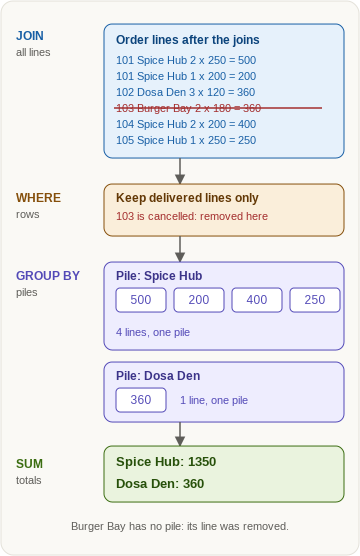
Simply: A SQL query runs its steps in a fixed order, not in the order you type them. Think of a shop counter: first you collect all the bills, then you set aside the bills you do not need with WHERE. Next, GROUP BY sorts the bills into one pile per shop, and aggregates such as sum() write one total on each pile. Last, HAVING keeps only the piles you want.
What to know: WHERE filters single rows before any piles exist, so it cannot test a total. GROUP BY makes one pile per key, and each aggregate function runs once per pile. HAVING filters the piles after the totals exist, and ORDER BY only sorts the finished rows.
Every query runs in this order, not in the order you type it:
FROM + JOIN   combine the tables into rows
WHERE         keep the single rows that pass (no piles exist yet)
GROUP BY      make one pile per key
aggregates    sum(), count()... run once per pile
HAVING        keep the piles that pass (totals now exist)
SELECT        choose the columns to show
ORDER BY      sort the finished rows (it adds nothing up)
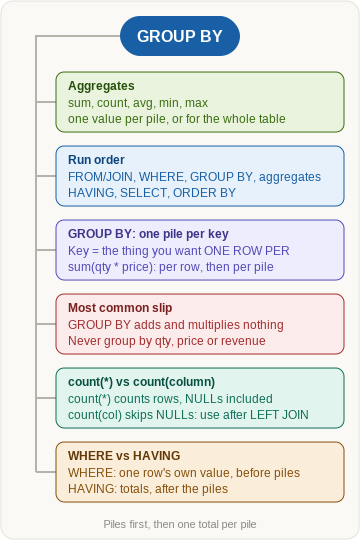
GROUP BY makes the piles, aggregates total each pile, and HAVING filters on those totals.
The most common mistake
GROUP BY adds nothing up
A common slip is thinking
GROUP BYmultiplies or adds the numbers. It only makes the piles.sum(qty * price)multiplies each line first, then adds the lines in each pile. The key is what you want one row per (a restaurant), not the numbers you add (qty, price) and not the total (revenue).
GROUP BY: one pile per key
Simply: GROUP BY sorts the rows into piles. Picture a box of receipts: you sort them into one pile per restaurant, then write one total on top of each pile. Each row goes into exactly one pile, decided by its key, which is the column named in GROUP BY. An aggregate such as sum() then gives one answer for each pile.
What to know: GROUP BY puts each row into the one pile that matches its key value, so the result has one row per pile. Aggregate functions such as sum() and count() then run once for each pile, so the key decides what one output row means.
Example: revenue per restaurant, delivered orders only. The revenue of one line is qty * price.
SQL
SELECT r.name AS restaurant, sum(oi.qty * m.price) AS revenue
FROM orders o
JOIN restaurants r ON r.id = o.restaurant_id
JOIN order_items oi ON oi.order_id = o.id
JOIN menu_items m ON m.id = oi.menu_item_id
WHERE o.status = 'delivered'
GROUP BY r.id, r.name
ORDER BY revenue DESC;
Drizzle
const revenue = sql<number>`sum(${orderItems.qty} * ${menuItems.price})`.mapWith(Number);
db.select({ restaurant: restaurants.name, revenue })
  .from(orders)
  .innerJoin(restaurants, eq(restaurants.id, orders.restaurantId))
  .innerJoin(orderItems, eq(orderItems.orderId, orders.id))
  .innerJoin(menuItems, eq(menuItems.id, orderItems.menuItemId))
  .where(eq(orders.status, 'delivered'))
  .groupBy(restaurants.id, restaurants.name)
  .orderBy(desc(revenue));
Piles after WHERE (order 103 was cancelled, so it is gone):
| pile (restaurant) | lines in the pile | total |
|---|---|---|
| Spice Hub | 500, 200, 400, 250 | 1350 |
| Dosa Den | 360 | 360 |
Result: Spice Hub 1350, Dosa Den 360. Burger Bay has no pile, because its only line was removed by WHERE.
Why this, not that:
- Key
r.id, r.namegives one row per restaurant. Noto.id, which gives one row per order. - Not
revenue, notqty, notprice. The total is the answer, so it can’t be the key.qtyandpriceare the numbers being added. status = 'delivered'keeps the status you want.!= 'cancelled'would also let in any future status, such as ‘refunded’.
Trigger card
When I see “per restaurant”, “for each X” or “by Y”, I put X in GROUP BY and the sum or count in SELECT, because GROUP BY decides how many rows come out.
Does GROUP BY multiply qty by price?
No.
GROUP BYonly decides the piles.qty * priceis worked out per line insidesum(), andsum()adds the lines in each pile.
Why does Postgres say "must appear in the GROUP BY clause or be used in an aggregate function"?
You selected a plain column, such as
m.name, that is neither grouped nor aggregated. A pile holds several dish names, so Postgres can’t pick one. Group by it, or wrap it in an aggregate.
count(*) vs count(column)
Simply: Think of a class register. count(*) counts every line on it, even a line with blank boxes. count(column) counts only the lines where that one box has something written in it. A LEFT JOIN can add a blank line for a customer with no orders, so you count a column from the right-hand table to leave that line out.
What to know: count(*) counts rows and never looks at the values inside them. count(column) counts only the rows where that column is not NULL, and count(distinct column) counts the different non-NULL values. After a LEFT JOIN, count a column from the right-hand table.
Example: orders per customer, keeping customers with no orders (a LEFT JOIN, see Joins).
SQL
SELECT c.name, count(*) AS all_rows, count(o.id) AS order_count
FROM customers c
LEFT JOIN orders o ON o.customer_id = c.id
GROUP BY c.id, c.name;
Drizzle
db.select({ name: customers.name, allRows: count(), orderCount: count(orders.id) })
  .from(customers)
  .leftJoin(orders, eq(orders.customerId, customers.id))
  .groupBy(customers.id, customers.name);
Piles (key = customer):
| customer | o.id values | count(*) | count(o.id) |
|---|---|---|---|
| Riya | 101, 103, 105 | 3 | 3 |
| Kabir | 102 | 1 | 1 |
| Meera | 104 | 1 | 1 |
| Arjun | NULL (filler row) | 1 (wrong) | 0 (right) |
Arjun has no orders, so the LEFT JOIN gives him one filler row with NULL in o.id. count(*) counts that row. count(o.id) skips the NULL.
Why this, not that:
- After a LEFT JOIN,
count(o.id)notcount(*). count(*)counts rows.count(column)counts non-NULL values.count(distinct column)counts different non-NULL values: on orders, 5, 5 and 3 (customers 1, 2, 3).count(*)does not count “the NULLs”. It counts rows and never looks inside them.
Trigger card
When I see a left join followed by a count, I count a column from the right table (
count(orders.id)), because the filler row for “no match” would makecount(*)say 1 instead of 0.
Does count(*) count NULLs?
It counts rows. A row with a NULL column is still one row, so it is counted.
count(column)is the one that skips NULLs.
How many orders did Riya place?
Three: 101, 103 and 105. The cancelled order counts, because this query has no WHERE.
WHERE vs HAVING
Simply: WHERE is a check at the door. It looks at each row alone, as it comes in, and drops the rows that fail, before any grouping happens. HAVING is a check after the piles are totalled. It looks at each pile’s total, such as a customer with at least two deliveries, and drops the piles that fail.
What to know: WHERE filters single rows before grouping, so it cannot use an aggregate such as count() or sum(). HAVING filters the piles after grouping and aggregating, so it can test those totals. A filter on one row’s own value goes in WHERE, and a filter on a total goes in HAVING.
Example: customers with 2 or more delivered orders.
SQL
SELECT c.name AS customer, count(o.id) AS delivered_orders
FROM customers c
JOIN orders o ON o.customer_id = c.id
WHERE o.status = 'delivered'
GROUP BY c.id, c.name
HAVING count(o.id) >= 2;
Drizzle
db.select({ customer: customers.name, deliveredOrders: count(orders.id) })
  .from(customers)
  .innerJoin(orders, eq(orders.customerId, customers.id))
  .where(eq(orders.status, 'delivered'))
  .groupBy(customers.id, customers.name)
  .having(sql`count(${orders.id}) >= 2`);
After WHERE (4 rows, 103 removed): Riya 101 and 105, Kabir 102, Meera 104.
Piles: Riya 2, Kabir 1, Meera 1.
After HAVING count(o.id) >= 2: Riya only. Result: Riya, 2.
Why this, not that:
- A filter on one row’s own value (status, city) goes in WHERE. A filter on a total (count, sum, avg) goes in HAVING.
WHERE count(o.id) >= 2fails with “aggregate functions are not allowed in WHERE”, because WHERE runs before the piles exist.
Trigger card
When the filter is about a total (count, sum, avg), it goes in HAVING. When it is about one row’s own value (status, city), it goes in WHERE, because WHERE runs before grouping and HAVING runs after.
Why is the result empty when I group by orders.id?
That makes one pile per order. No pile reaches 2 orders, so HAVING keeps nothing. Group by what you count per, which is the customer.
Why can't I write the total in WHERE?
WHERE runs before grouping, so no piles and no counts exist yet. Move the test to HAVING.
Say it in an interview
“GROUP BY puts rows into piles, one per distinct key value. Aggregates like sum, count, avg, min and max run once per pile. The key is the thing you want one row per. WHERE filters rows before the piles exist, HAVING filters the piles after they are totalled. count(*) counts rows, count(column) skips NULLs.”
Questions interviewers ask
Tap a question to see the answer.
What does GROUP BY do?
It splits the rows into piles, one per distinct key value. Aggregates then give one value per pile.
What is the difference between WHERE and HAVING?
WHERE filters single rows before grouping. HAVING filters the piles after grouping and aggregating.
Which aggregate functions do you know?
sum(),count(),avg(),min()andmax().
Can you use an aggregate in WHERE?
No. WHERE runs before the piles exist. Use HAVING.
What is the difference between count(*), count(column) and count(distinct column)?
Rows, rows with a non-NULL value, and different non-NULL values.
What is the difference between GROUP BY and DISTINCT?
DISTINCT removes duplicate output rows. GROUP BY makes piles, so you can aggregate them. Use GROUP BY as soon as you need sum, count or avg.
Can you group by more than one column?
Yes. Together the columns form one combined key, so
GROUP BY restaurant_id, statusmakes one pile per pair.
Why can you select customers.name when you group by customers.id?
Postgres accepts it when you group by the table’s primary key, because each id has exactly one name. Columns from other tables still need GROUP BY or an aggregate.
Mental map
Watch
Alex The Analyst, about 12 minutes: GROUP BY and aggregate functions, in PostgreSQL (the dialect used on this page).
Want more? The detailed Aggregates page has the same sections with every step table, the wrong versions, NULL edge cases, and more interview questions.
← Joins · Window functions →