Networking · 9 of 9
- Networking quick revision
- HTTP message
- Request lifecycle
- DNS
- TCP and UDP
- TLS and HTTPS
- HTTP caching
- Origin
- CORS · you are here
What this page is for
Intent: understand why the browser shows “blocked by CORS policy”, and answer every common CORS interview question.
You’ll learn: what an origin is · why browsers block reads · the two headers that matter · preflight · cookies across sites · how to fix it · why CORS is not CSRF protection.
Time: about 7 minutes. Every section has a longer version on the detailed CORS page.
Words you need first
- Origin: the “address” of a web page, made of three parts: scheme (
https), host (shop.com) and port (443, the default for https). Two URLs share an origin only if all three match.http://localhost:3000andhttp://localhost:8000are different origins, because the port differs. - Same-origin policy (SOP): the browser’s default safety rule. A page’s JavaScript may read replies only from its own origin.
- CORS (Cross-Origin Resource Sharing): the way a server says “pages from these other origins may read my replies too.” It relaxes the same-origin policy, only for the origins the server names.
- Header: a
name: valueline sent with a request or a reply, e.g.Origin: https://shop.com. fetch(): the JavaScript function a page uses to call an API (a server URL that returns data, usually JSON).- Cookie: a small value the browser stores for a site and sends back on every request to that site. It’s how a site remembers you’re logged in.
Why it exists
You’re logged in to bank.com, so your browser holds its cookie. You open evil.com in another tab. Its script calls fetch("https://bank.com/api/balance", { credentials: "include" }). If the bank’s cookie is allowed to travel to other sites (its SameSite setting is None and it is Secure; with anything else, including the usual Lax default, the browser doesn’t attach it), the browser attaches it. Without the same-origin policy, evil.com could read your bank data. So by default the browser hides cross-origin replies from the page, and CORS is the controlled way to allow the ones a server trusts.
The picture
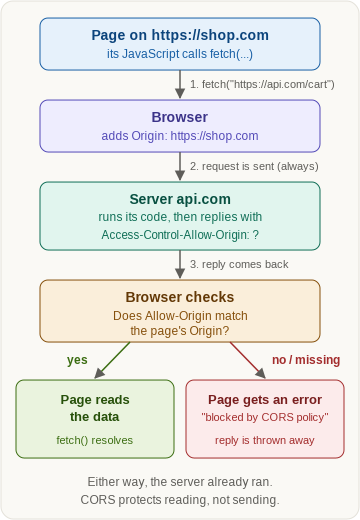
How it works, with an example
Simply: Picture a shop asking a warehouse for items. The browser adds an Origin label, and the warehouse must send that origin back in an Access-Control-Allow-Origin header. This is CORS (Cross-Origin Resource Sharing). The page may read the reply only if the origin matches.
What to know: Your shop’s front end is on https://shop.com. Its API is on https://api.com.
- The page runs
fetch("https://api.com/cart"). - The browser sends the request and adds
Origin: https://shop.comon its own, so the server knows which page is asking. - The server runs its code and replies. To allow the shop, it adds
Access-Control-Allow-Origin: https://shop.com. - The browser compares the two. If they match (or the value is
*, meaning “any origin”), the page gets the data. If the header is missing or different, the page gets an error and the reply is thrown away.
The most common mistake
CORS blocks reading, not sending
The server still receives the request and runs it. CORS only decides whether the page may read the reply. curl and Postman aren’t browsers, so they ignore CORS completely. That’s why an API “works in Postman but not in the browser.”
Preflight
Simply: Some requests are not simple, such as a PUT or a JSON body. The browser first sends a small OPTIONS request to ask what is allowed. This check is the preflight, like calling a shop ahead. The real request goes out only after a yes.
What to know:
- Simple request (no preflight):
GET,HEADorPOST, with only basic headers, and a body that’s a form or plain text. - Needs a preflight:
PUT,PATCHorDELETE, a JSON body (Content-Type: application/json), or a custom header such asAuthorization.
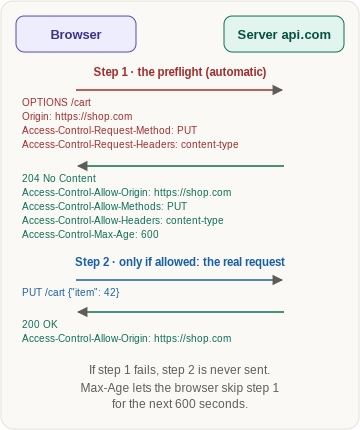
In the preflight, Access-Control-Request-Method and Access-Control-Request-Headers say what the real request will use. The server answers with Access-Control-Allow-Methods and Access-Control-Allow-Headers.
Cookies across sites
Simply: Credentials means cookies and other login data. A membership card stays at home by default. To send it, the page must ask, and the server must name one exact origin and allow credentials.
What to know:
To send them:
- the page uses
fetch(url, { credentials: "include" }); - the server replies
Access-Control-Allow-Credentials: true; Access-Control-Allow-Originmust be the exact origin. The wildcard*(“anyone”) isn’t allowed, because “any website may read this user’s private data” is exactly what the same-origin policy exists to stop.
How to fix a CORS error
Simply: Think of a guest list at a door. Fix it on the server, which must name the front end’s origin. In development, a proxy passes calls on to the real API.
What to know:
- Fix it on the server: allow your front end’s origin, e.g.
app.use(cors({ origin: "https://shop.com" }))in Express. - In local development: use your dev server’s proxy (a middleman that forwards requests). The page calls
/apion its own origin, and the dev server passes it to the real API, so there’s no cross-origin request at all. - Don’t: use a browser extension, turn off browser security, or use
mode: "no-cors". That last one only gives you an empty reply you can’t read.
CORS is not CSRF protection
Simply: CSRF (Cross-Site Request Forgery) is when another site makes your browser send a request you did not mean to send, with your cookies attached. Think of a forged check: the bank pays it, even though the forger never sees the bank’s reply.
What to know: For example, a hidden form on evil.com that POSTs to bank.com/transfer.
CORS doesn’t stop this, because CORS doesn’t stop the request from being sent. A form POST is a simple request, so it goes out with no preflight, and the server runs it. Real CSRF defenses are CSRF tokens (a secret value only your own pages know) and SameSite cookies (a cookie setting that stops the browser from sending the cookie on requests that come from other sites).
Say it in an interview
“Browsers follow the same-origin policy: a page can only read responses from its own origin, which is scheme plus host plus port. That stops a random site from reading your bank data using your cookies. CORS is how a server relaxes that. The browser sends an
Originheader, and if the server replies with a matchingAccess-Control-Allow-Origin, the page can read the response. Otherwise the browser hides it. The request still reaches the server, so CORS isn’t server-side security and isn’t CSRF protection. For non-simple requests, likePUTor a JSON body, the browser first sends anOPTIONSpreflight. For cookies, the server must also sendAllow-Credentials: truewith an exact origin, not a wildcard. You fix CORS on the server, or with a proxy in development.”
Questions interviewers ask
Tap a question to see the answer.
What is CORS, and why does it exist?
A browser mechanism that lets a server allow other origins to read its replies. It exists because the same-origin policy blocks those reads by default, to stop sites from reading your data with your cookies.
Who enforces CORS, the browser or the server?
The browser. The server only sends headers. That’s why curl and Postman ignore it.
Is the request blocked, or the response?
The response. The request reaches the server and runs. Only a failed preflight stops the real request.
How do you fix a CORS error?
On the server: return
Access-Control-Allow-Originwith the front end’s origin (plus methods and headers for preflights). In development, use a proxy. Never fix it in the front end.
What is a preflight, and when is it sent?
An automatic
OPTIONSrequest that asks permission before a non-simple request: methods other than GET, HEAD or POST, a JSON body, or custom headers likeAuthorization.
What do Access-Control-Request-Method and Access-Control-Request-Headers do?
They’re preflight request headers that tell the server which method and headers the real request will use, so the server can approve or refuse them.
Why can't you use
*with cookies?Because it would let any website read a logged-in user’s private data. With credentials, the server must name the exact origin.
Does CORS protect against CSRF?
No. CORS hides the reply but the forged request still runs. Use CSRF tokens and
SameSitecookies.
SOP vs CORS vs CSP?
SOP: the browser’s default rule, where a page reads only its own origin. CORS: a server loosening SOP for its own replies. CSP (Content Security Policy): a header a site puts on its own pages to limit where they may load scripts from, a defense against XSS (an attacker getting their script to run inside your page).
Is CORS a defense against XSS?
No, that’s a known wrong answer. CORS is about reading cross-origin replies. XSS defenses are escaping output and CSP.
Mental map
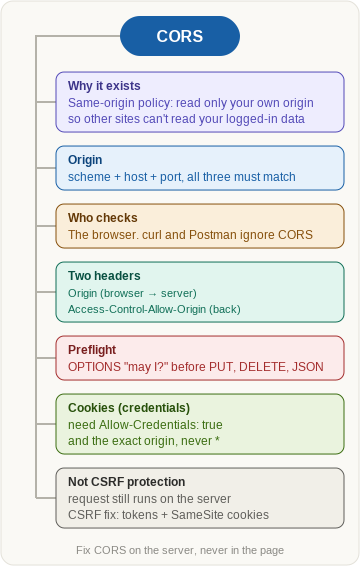
Watch
Web Dev Simplified, about 6 minutes: what CORS is and how it relates to the same-origin policy.
Want more? The detailed CORS page has the same sections with raw HTTP, the exact simple-request rules, server config, debugging, and more interview questions.
← Origin · Back to Networking →