Networking · 7 of 9
- Networking quick revision
- HTTP message
- Request lifecycle
- DNS
- TCP and UDP
- TLS and HTTPS
- HTTP caching · you are here
- Origin
- CORS
What this page is for
Intent: understand how a browser or CDN keeps a copy of a file, when it uses that copy, and when it asks the server first. Answer the common HTTP caching interview questions.
You’ll learn: why caching matters · where caches live ·Cache-Control· fresh vs stale · ETag and304· cache busting · what to cache.
Time: about 7 minutes. Every section has a longer version on the detailed HTTP caching page.
Words you need first
- HTTP (HyperText Transfer Protocol): the rules a browser and a server use to ask for files and send them back. A request is a
GET(give me this URL). A reply has a status like200 OK. - Cache: a store of copies. The next request for the same URL can use the copy instead of the network.
- Browser cache: the copy store inside one user’s browser.
- CDN (Content Delivery Network): servers around the world that hold copies of files close to users. A shared cache.
- Proxy: a middle server, often run by a company or ISP, that can keep copies too.
- Header: a
name: valueline sent with a request or reply, e.g.Cache-Control: max-age=3600. - ETag (entity tag): a short label for one version of a file, e.g.
"7f3a-9c1". A changed file gets a new label. 304 Not Modified: a reply that means “your copy is still good”. It has no body.
Why it exists
A page loads logo.png, app.css and app.js on every visit. Without caching, the browser downloads the same bytes every time. On a slow phone network, that costs seconds, and the site pays for the bandwidth.
Example: shop.com/styles/site.css is 80 KB. A customer opens shop.com 20 times a week. Without caching, that is 1.6 MB of CSS for a file that never changed.
The picture
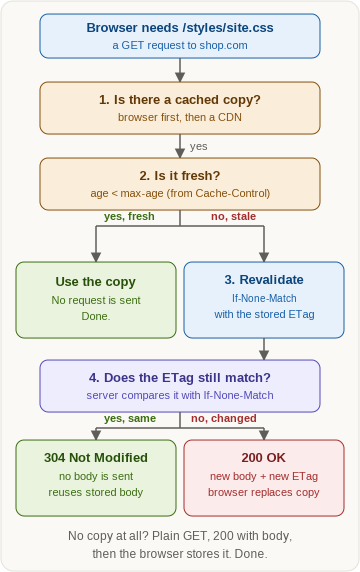
Read it top to bottom. Each yes/no question is one check. A repeat visit usually stops at “Use the copy”.
How it works, with an example
Simply: Your browser keeps a copy of a file, like a recipe card in a kitchen drawer. A fresh copy (new enough) is used with no request. A stale copy (too old) is checked with the server, which may reply 304 Not Modified to say the copy is still good.
What to know: Take /styles/site.css on shop.com.
- The first reply arrives with
Cache-Control: max-age=3600andETag: "7f3a-9c1". The browser stores the body and the headers. - Ten minutes later, the copy is fresh (10 minutes old, less than the 3600-second
max-age). The browser uses it. No request leaves the computer. - Two hours later, the copy is stale. The browser sends
If-None-Match: "7f3a-9c1"with the request. - The file has not changed, so the server replies
304 Not Modifiedwith no body. - The browser reuses its stored body. No file bytes were downloaded.
If the file had changed, step 4 would give 200 OK with the new file and a new ETag.
The most common mistake
no-cachedoes not mean "do not cache"
no-cachemeans “you may store it, but check with the server before every reuse”. To say “never store this”, useno-store. Mixing them up is the classic trick question. For a bank page with account data,no-storeis the right choice.
Fresh or stale
Simply: A copy is fresh while it is young enough to use, and stale once it is too old. The server sets the limit in a header called Cache-Control, using max-age in seconds.
What to know: A stored copy is fresh when its age is less than its max-age. Age is how long the copy has been stored. A fresh copy is used with no request. A stale copy must be checked with the server before use.
Cache-Control carries these rules. The main directives:
max-age=N: fresh for N seconds.no-cache: store it, but check with the server before each reuse.no-store: do not store it at all.private: only the user’s own browser may store it. CDNs must not.public: any cache may store it, even with cookies or login data.s-maxage=N: a lifetime for shared caches (CDN, proxy) only. It overridesmax-agethere.immutable: the file never changes at this URL, so do not check during its lifetime.
Example: Cache-Control: public, max-age=60, s-maxage=3600 means browsers keep a copy for 1 minute and the CDN keeps it for 1 hour.
Revalidation and 304
Simply: A stale copy is checked with one question: has this file changed? The browser sends its ETag, a short version label, and the server answers 304 Not Modified with no file if the label still matches.
What to know: Revalidation happens when a copy is stale. The browser sends a conditional request: the same GET, plus a validator from the stored copy.
- ETag is the stronger validator. The browser sends it back as
If-None-Match. - Last-Modified is a date. The browser sends it back as
If-Modified-Since. It is weaker, because it has one-second resolution.
The server answers one of two ways:
- File unchanged:
304 Not Modified, with an empty body. The browser uses its stored body. - File changed:
200 OK, with the new body and a new ETag.
GET /styles/site.css HTTP/1.1
Host: shop.com
If-None-Match: "7f3a-9c1"HTTP/1.1 304 Not Modified
ETag: "7f3a-9c1"What to cache
Simply: Each kind of file needs its own lifetime. Hashed files, such as app.3f9a.js, can be kept for a year, while the HTML page that links to them is checked often. The hash, a code made from the file’s content, is in the name, so a changed file gets a new name.
What to know:
- Hashed static files (
app.3f9a.js, images): cache for a long time, e.g.Cache-Control: public, max-age=31536000, immutable(one year). - HTML pages: they link to the hashed files and change at each deploy. Use
no-cacheor a shortmax-age, so a new deploy shows up quickly. - API responses: a public product list can be cached for 30 to 60 seconds. Personal data, such as a cart or bank balance, should use
private, no-store.
Cache busting means changing the URL when the content changes. Build tools put a hash of the file content in the name: app.3f9a.js. A new version gets a new URL, so the old copy is never wrong, and a one-year lifetime is safe.
Say it in an interview
“HTTP caching lets browsers and CDNs reuse stored copies of responses. The server sets
Cache-Control. While a copy is fresh, meaning its age is undermax-age, the cache uses it with no request. When it is stale, the cache revalidates: it sendsIf-None-Matchwith the stored ETag. If the file is unchanged, the server answers304 Not Modifiedwith no body. If it changed, the server answers200with the new file. For hashed static files, I use a longmax-ageandimmutable. For HTML, I useno-cache. For personal data, I useno-store.no-cachemeans store but always check.no-storemeans never store.”
Questions interviewers ask
Tap a question to see the answer.
Why does HTTP caching matter?
It removes repeated downloads. A fresh copy costs no network at all, and a
304is a small request with no body.
Where do caches live?
In the browser (private to one user), in CDNs (shared, close to users), and in proxies run by companies or ISPs (shared).
What is the difference between
no-cacheandno-store?
no-cacheallows storing, but the cache must check with the server before every reuse.no-storeforbids storing at all.
What is the difference between
privateandpublic?
privatelets only the user’s browser store the response.publiclets any cache store it, even when the request had cookies.
What makes a copy fresh or stale?
Fresh means its age is less than
max-age. After that it is stale, and the cache must check with the server first.
What is an ETag, and how does a
304work?An ETag labels one version of a file. The browser sends it as
If-None-Match. If it still matches, the server replies304with no body.
ETag or Last-Modified: which is better?
ETag is more precise. It names an exact version, while a date has one-second resolution. Use both when you can.
Why use hashed file names?
A changed file gets a new URL, so old copies are never served by mistake. That makes a very long lifetime safe.
Should you cache HTML?
Not for long. HTML points to new asset URLs at each deploy. Use
no-cacheor a shortmax-age.
What does
s-maxagedo?It sets the lifetime for shared caches only, such as a CDN. It overrides
max-agethere.
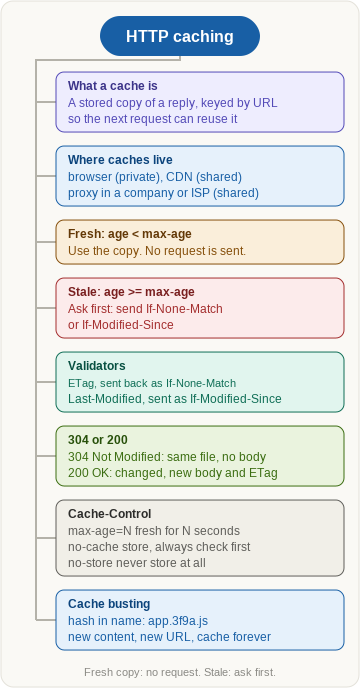
Mental map
Watch
the roadmap, about 14 minutes: HTTP caching, Cache-Control headers, and cache validation.
Want more? The detailed HTTP caching page has the raw headers, Vary, exact revalidation rules, stale-while-revalidate, and more interview questions.
← TLS and HTTPS · Origin →