Networking · 1 of 9
- Networking quick revision · you are here
- HTTP message
- Request lifecycle
- DNS
- TCP and UDP
- TLS and HTTPS
- HTTP caching
- Origin
- CORS
What this page is for
Intent: revise all of networking in one go, the night before an interview.
Covers: HTTP messages · what happens when you type a URL · DNS · TCP and UDP · TLS and HTTPS · HTTP caching · origin · CORS.
Time: about 10 minutes. Every topic below links to its quick page and its detailed page.
Words you need first
- Client / server: the client (your browser or app) asks; the server answers.
- IP address: a machine’s number on the internet, e.g.
203.0.113.10. - Port: a number that picks the program on a machine. HTTPS uses 443, HTTP uses 80.
- Packet: a small piece of data sent across the network on its own.
- Round trip (RTT): one message there and the reply back. Most setup steps cost one each.
- HTTP (HyperText Transfer Protocol): the language of web requests and replies.
- Header: a
name: valueline sent with a request or reply. - Status code: the 3-digit result of a request, e.g.
200 OK,404 Not Found. - DNS (Domain Name System): the internet’s phone book: turns
shop.cominto an IP address. - Resolver: the DNS server (your ISP’s, or
8.8.8.8) that does the lookup for you. - TTL (time to live): how many seconds an answer may be cached.
- TCP (Transmission Control Protocol): turns lost, out-of-order packets into one reliable, ordered stream.
- UDP (User Datagram Protocol): sends single messages with no setup and no retries.
- Handshake: the messages two sides exchange before real data flows.
- TLS (Transport Layer Security): encrypts the connection and proves the server’s identity. HTTPS is HTTP over TLS.
- Certificate: a signed file that says “this public key belongs to shop.com”.
- CA (certificate authority): a company browsers trust to sign certificates.
- Cache: a stored copy of a reply, reused so you don’t ask again.
- ETag: a version label for a reply, used to ask “has this changed?”.
- Origin: scheme + host + port, e.g.
https://shop.com:443. - Same-origin policy (SOP): the browser rule that a page may read replies only from its own origin.
- CORS (Cross-Origin Resource Sharing): how a server lets pages from other origins read its replies.
- Preflight: an automatic
OPTIONSrequest that asks permission before a risky cross-origin request. - Cookie: a small value the browser stores for a site and sends back to it, usually your login session.
The big picture
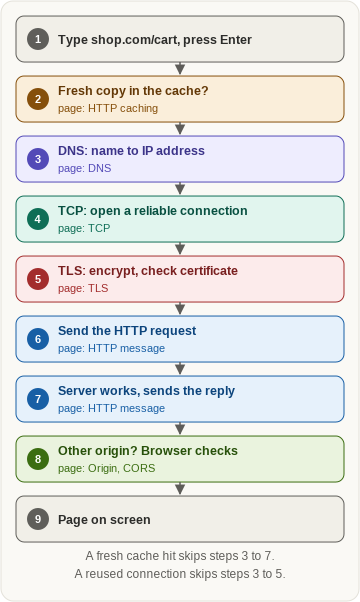
Every topic is one step of loading a page:
Topic by topic
1. HTTP message
- Simply: HTTP is a letter format. The browser sends a request (what it wants, plus labels called headers), and the server sends back a response with a status code saying how it went.
- A request is a start line (
GET /cart HTTP/1.1), headers, a blank line, then an optional body. A response is the same, but its start line has the status (HTTP/1.1 200 OK). - Methods: GET reads, POST creates, PUT replaces, PATCH changes part, DELETE removes. Safe = changes nothing (GET, HEAD, OPTIONS; HEAD is GET without the body). Idempotent = repeating it has the same effect as once (GET, HEAD, OPTIONS, PUT, DELETE). POST isn’t idempotent, and PATCH isn’t guaranteed to be.
- Status families: 2xx worked, 3xx go elsewhere, 4xx your request is wrong, 5xx the server failed. 401 = who are you? 403 = I know you, still no.
- HTTP is stateless: each request stands alone, and the server remembers nothing between them. Cookies add memory.
- Trap: POST is not idempotent, so a retried POST can create two orders.
- Quick · Detailed
2. Request lifecycle
- Simply: typing a URL kicks off a chain: find the server’s address (DNS), open a connection (TCP), lock it (TLS), then ask for the page (HTTP). Each step must finish before the next.
- Type URL → cache check → DNS → TCP handshake → TLS handshake → HTTP request → server (load balancer, app, database) → response → browser renders and fetches CSS, JS, images.
- A first HTTPS visit costs about 4 round trips before the first byte (DNS from the resolver’s cache, TCP, TLS 1.3, HTTP). A full DNS lookup adds several more.
- A second visit is faster: cached DNS, reused connection, cached files.
- Trap: the steps can’t overlap; you need the IP before TCP, and TCP before TLS.
- Quick · Detailed
3. DNS
- Simply: DNS is the internet’s phone book. A resolver looks up
shop.comstep by step (root, then.com, then the site’s own server) and hands back its IP address. - Browser cache → OS cache → recursive resolver → it asks the root server, then the TLD server (
.com), then the authoritative server, which holds the real record. - Records: A (IPv4 address), AAAA (IPv6), CNAME (alias to another name), MX (mail server), NS (who’s authoritative), TXT (notes, e.g. verification).
- Answers are cached for their TTL, which is why DNS changes take time to spread.
- Mostly UDP port 53 (one small packet each way); TCP when the answer is too big.
- Trap: the browser doesn’t ask the authoritative server itself; the resolver does the walk.
- Quick · Detailed
4. TCP and UDP
- Simply: TCP is a phone call: set up first, nothing lost, everything in order. UDP is a postcard: just sent, faster, but it can get lost.
- Three-way handshake: SYN → SYN-ACK → ACK, one round trip; both sides exchange random starting sequence numbers.
- Reliable: every byte is numbered, the receiver ACKs (acknowledges) what arrived, and the sender resends what wasn’t ACKed.
- Flow control protects the receiver’s buffer; congestion control protects the network.
- UDP: no handshake, no retries, no ordering. Used for video calls, games, DNS, and QUIC (which HTTP/3 runs on).
- Trap: TCP doesn’t encrypt anything; TLS does.
- Quick · Detailed
5. TLS and HTTPS
- Simply: TLS puts the conversation in a locked box. The server shows a certificate to prove who it is, and both sides agree on a key so nobody in between can read or change the data.
- TLS gives encryption (nobody can read it), integrity (nobody can change it unnoticed) and identity (the server proves it’s really shop.com).
- Asymmetric keys (public and private) are used once to agree a secret; fast symmetric encryption protects everything after.
- TLS 1.3 handshake: 1 round trip (TLS 1.2 needed 2).
- The server sends a certificate; the browser follows the chain up to a CA it trusts and checks the name and dates. That’s what stops a man-in-the-middle.
- Trap: HTTPS hides the path and content, but an observer still sees the IP address and the domain name (sent unencrypted in the handshake’s SNI field, Server Name Indication).
- Quick · Detailed
6. HTTP caching
- Simply: the browser keeps a copy of a reply.
Cache-Controlsays how long the copy stays fresh, and an ETag lets the browser ask “has this changed?” and get a short304if not. Cache-Control: max-age=N= the copy is fresh for N seconds; reuse it with no request.- After that it’s stale: the browser revalidates with
If-None-Match: <ETag>. Unchanged → 304 Not Modified (no body); changed → 200 with the new copy. - no-cache = store it, but check with the server every time. no-store = never store it.
- Static files get a hash in the name (
app.3f9a.js) and cache “forever”; HTML is revalidated. - Trap: no-cache doesn’t mean “don’t cache”; that’s no-store.
- Quick · Detailed
7. Origin and same-origin policy
- Simply: an origin is one exact address: scheme, host and port. The browser lets a page read replies only from its own origin, so another site can’t read your data.
- Origin = scheme + host + port. The path doesn’t count.
httpvshttps,api.shop.comvsshop.com, or port 8443 vs 443 each make a different origin. - The same-origin policy blocks a page from reading another origin’s replies, iframe content and storage. It still allows loading images, scripts and CSS, submitting forms and following links.
- Site (scheme + main domain) is looser than origin; cookies’
SameSiteuses site. - Trap: the policy blocks reading, not sending.
- Quick · Detailed
8. CORS
- Simply: CORS is the server’s permission slip. The browser says which origin is asking, and the server’s reply says which origins may read it. If they match, the page can read the reply.
- The browser adds
Origin: https://shop.com; the server repliesAccess-Control-Allow-Origin: https://shop.com; if they match, the page may read the reply. - Preflight: for PUT, PATCH or DELETE, a JSON body or custom headers, the browser first sends
OPTIONSto ask. - Cookies cross-origin need
credentials: "include",Access-Control-Allow-Credentials: true, an exact origin (no*), and aSameSite=None; Securecookie. - Fix CORS on the server (or with a dev proxy), never in the front end.
- Trap: CORS is not CSRF protection (CSRF, cross-site request forgery: another site makes your browser send a request with your cookies). The request still runs on the server.
- Quick · Detailed
Top questions
Tap a question to see the answer.
What happens when you type a URL and press Enter?
Cache check, DNS lookup, TCP handshake, TLS handshake, HTTP request, server work, HTTP response, then the browser fetches the page’s CSS, JS and images and renders it.
TCP vs UDP?
TCP sets up a connection and delivers every byte reliably and in order. UDP sends independent messages with no setup or retries: faster, used for calls, games, DNS and QUIC.
Explain the TCP three-way handshake.
SYN (client’s start number), SYN-ACK (server’s start number, acknowledging the client’s), ACK (acknowledging the server’s). It costs one round trip.
How does DNS resolution work?
The resolver checks its cache, then asks a root server, then the TLD server, then the authoritative server, and caches the answer for its TTL.
Why does DNS use UDP?
One small question and answer fit in one packet each way, so a handshake would cost more than the lookup. It falls back to TCP for large answers.
What's the difference between HTTP and HTTPS?
HTTPS is HTTP inside a TLS connection: encrypted, protected from changes, and the server proves its identity with a certificate.
How does the browser know a certificate is real?
It checks the signature chain up to a root CA it already trusts, and checks that the name matches the site and the dates are valid.
Symmetric vs asymmetric encryption, and why does TLS use both?
Asymmetric (public/private keys) lets strangers agree a secret but is slow. Symmetric (one shared key) is fast. TLS uses asymmetric once to agree the key, then symmetric for the data.
GET vs POST?
GET reads and should change nothing; it can be cached and bookmarked. POST sends data to create or act; it isn’t idempotent.
PUT vs PATCH?
PUT replaces the whole resource; PATCH changes part of it.
401 vs 403?
401: you’re not logged in (who are you?). 403: you’re logged in but not allowed.
no-cache vs no-store?
no-cache may store the copy but must check with the server before using it. no-store never stores it.
What is an ETag and a 304?
An ETag is a version label. The browser sends it back in
If-None-Match; if nothing changed, the server replies 304 Not Modified with no body.
What is an origin, and what does the same-origin policy do?
Scheme + host + port. The policy stops a page from reading replies from other origins, so one site can’t read your data from another.
What is CORS, and who enforces it?
A way for a server to let other origins read its replies, using
Access-Control-*headers. The browser enforces it; curl and Postman ignore it.
What is a preflight request?
An automatic
OPTIONSrequest the browser sends before non-simple cross-origin requests (PUT, PATCH, DELETE, JSON body, custom headers) to ask permission.
Does CORS protect against CSRF?
No. CORS only hides the reply; the forged request still runs. Use CSRF tokens and
SameSitecookies.
Does TCP encrypt data?
No. TLS, running on top of TCP, does.
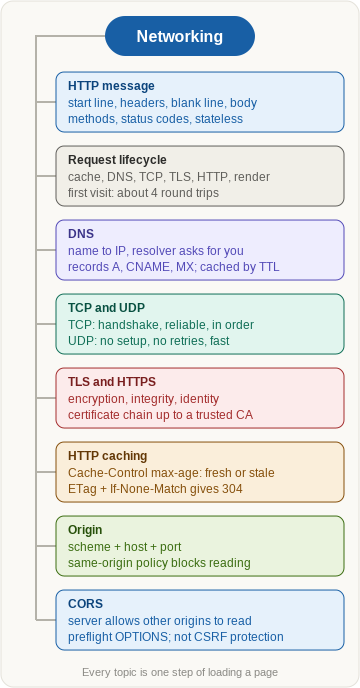
Mental map
Watch
ByteByteGo, short video: the whole journey from typing a URL to the page on screen. For the long version, Hussein Nasser’s detailed analysis (about 45 minutes) goes step by step.
← Networking · HTTP message →