Networking · 8 of 9
- Networking quick revision
- HTTP message
- Request lifecycle
- DNS
- TCP and UDP
- TLS and HTTPS
- HTTP caching
- Origin · you are here
- CORS
What this page is for
Intent: learn what an origin is and what the same-origin policy blocks, so CORS errors and cookie rules make sense.
You’ll learn: what counts as an origin · same origin or not · what the policy blocks and allows · origin vs site · why cookies follow hosts, not origins.
Time: about 6 minutes. Every section has a longer version on the detailed Origin page.
Words you need first
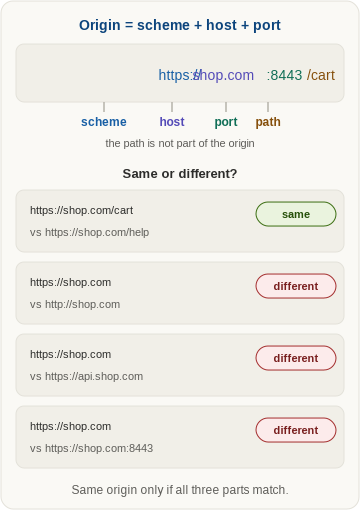
- Origin: the “address” of a web page. It has three parts: scheme (
https), host (shop.com) and port (443). Two URLs share an origin only if all three match. The path (/cart) is not part of it. - Scheme: the protocol at the start of a URL,
httporhttps. Host: the domain name, such asshop.com. Port: the number after the colon, such as:8000. Left out, it is 80 forhttpand 443 forhttps. - Same-origin policy (SOP): the browser’s default safety rule. A page’s JavaScript may read data only from its own origin.
- Site: a looser idea than origin. It is the scheme plus the main domain, with ports ignored.
shop.comandapi.shop.comare different origins but the same site. - Cookie: a small value a site stores in your browser and gets back on each request. It is how a site remembers you are logged in.
- SameSite: a cookie setting that limits when the browser sends the cookie on requests from other sites.
fetch(): the JavaScript function a page uses to call a server. XHR is the older way to do the same.- DOM: the page’s content as JavaScript sees it. iframe: a box inside a page that shows another page.
- localStorage: browser storage a page can use to save data. Each origin has its own.
- CORS: the way a server says “pages from these other origins may read my replies.” See CORS.
Why it exists
You are logged in to bank.com, so your browser holds its cookie. You open evil.com, and its script calls fetch("https://bank.com/api/balance", { credentials: "include" }). If the bank’s cookie is allowed to travel to other sites (SameSite=None), the browser attaches it. Without a rule, evil.com could read the reply.
The same-origin policy stops this: a page may only read what its own origin sent.
The picture
How it works, with an example
Simply: Picture a shop with its front counter at shop.com and its stock room at api.shop.com. Before a page reads data from another address, the browser compares the two addresses part by part. If one part differs, the request is cross-origin, which means it goes to a different origin. The browser adds an Origin label that the page cannot change, and it checks the server’s reply before the page may read it.
What to know: Your shop’s page is at https://shop.com/cart. Its script wants data from https://api.shop.com/items.
- The browser compares the two URLs part by part. Scheme:
httpsandhttps, the same. Host:shop.comandapi.shop.com, different. - Because one part differs, the request is cross-origin.
- The browser sends the request and adds
Origin: https://shop.comon its own, so the server knows who is asking. Page code cannot change this header. - The server replies. The browser checks whether the reply allows this origin (CORS). If not, the page’s
fetchfails and the reply is hidden from the page’s JavaScript.
The most common mistake
Thinking a path or a subdomain makes a new origin
Only scheme, host and port count.
https://shop.com/cartandhttps://shop.com/helpare the same origin. Buthttps://shop.comandhttps://api.shop.comare different origins. So arelocalhost:8000andlocalhost:9000. Andlocalhostand127.0.0.1are different hosts, so they are different origins too.
Same origin or not?
Simply: Think of an office building. The domain name (the host) is the building, the scheme (http or https) is the entrance, and the port is the door number. Two addresses are the same origin only if all three match. The room you walk to (the path) does not count.
What to know: Compare the three parts of each pair, as in this table.
| Page URL | Other URL | Same origin? | What differs |
|---|---|---|---|
https://shop.com/cart | https://shop.com/help | Yes | Nothing. The path does not count |
https://shop.com | https://shop.com:443 | Yes | Nothing. 443 is the default for https |
https://shop.com | http://shop.com | No | Scheme |
https://shop.com | https://api.shop.com | No | Host |
http://localhost:8000 | http://localhost:9000 | No | Port |
What the policy blocks and allows
Simply: Think of a postal service. The same-origin policy is the browser’s rule that sets these limits. A page can send a letter to another address and can show a picture from another origin, but it cannot read the reply that comes back. The policy limits reading. It does not limit sending.
What to know: Here is what is blocked and what is allowed.
Blocked: page JavaScript cannot read:
- the body of a cross-origin
fetchor XHR reply, unless CORS allows it; - the DOM of a cross-origin
iframe, so a page cannot see inside an embedded page from another origin; - the localStorage of another origin.
Allowed:
- sending requests to other origins. Simple requests go straight out. Others wait for a preflight check (CORS);
- following links and submitting HTML forms to other origins;
- showing images, scripts, stylesheets and iframes from other origins. The page can display or run them, but it cannot read their bytes.
Origin vs site
Simply: Think of a company with several offices. An origin is one exact office address: scheme, host and port. A site is the whole company, so shop.com and api.shop.com are different origins but the same site. Port numbers do not change the site.
What to know: Origin is strict: scheme, host and port must all match. Site is looser: scheme and main domain, ports ignored. Cookies follow their own rule: host and path, with no port.
| Origin | Site | Cookie scope | |
|---|---|---|---|
| Parts | scheme + host + port | scheme + main domain | host + path |
| Port counts? | Yes | No | No |
| Used for | the same-origin policy, CORS, the Origin header | the SameSite cookie setting | which cookies get sent |
localhost:8000 vs localhost:9000 | different | same site | same cookies |
So a cookie set by localhost:9000 is visible to a page on localhost:8000. But their localStorage is separate, because localStorage follows the origin.
Say it in an interview
“An origin is the scheme, host and port of a URL. The path doesn’t count. The same-origin policy lets a page read only responses from its own origin, so a random site can’t read your bank data with your cookie. Site is looser: scheme plus main domain, ports ignored. Cookies follow host and path, not origin, and ignore the port. localStorage follows the origin. The policy blocks reading, not sending: a page can send a cross-origin request and show cross-origin images, scripts and iframes, but it can’t read the reply or the other origin’s storage. CORS is how a server allows exceptions.”
Questions interviewers ask
Tap a question to see the answer.
What is an origin?
The scheme, host and port of a URL. The path, query and fragment are not part of it.
Is
https://shop.com/cartthe same origin ashttps://shop.com/help?Yes. Only scheme, host and port are compared.
Is
https://shop.comthe same origin ashttps://shop.com:443?Yes. 443 is the default port for https, so it is implied.
What does the same-origin policy block?
Page JavaScript reading a cross-origin reply, reading the content of a cross-origin iframe, and reading another origin’s localStorage.
What does the same-origin policy allow?
Sending requests, following links, submitting forms, and showing images, scripts, stylesheets and iframes from other origins.
What is the difference between same origin and same site?
Origin compares scheme, host and port. Site compares scheme and main domain, and ignores the port.
api.shop.comandshop.comare the same site but different origins.
Do cookies follow the origin rules?
No. Cookies are scoped by host and path, not port. So a cookie set by
localhost:9000is sent tolocalhost:8000too.
Can two ports on localhost share localStorage?
No. A different port is a different origin, and localStorage is per origin.
Are
localhostand127.0.0.1the same origin?No. The host names differ, even though both mean this computer.
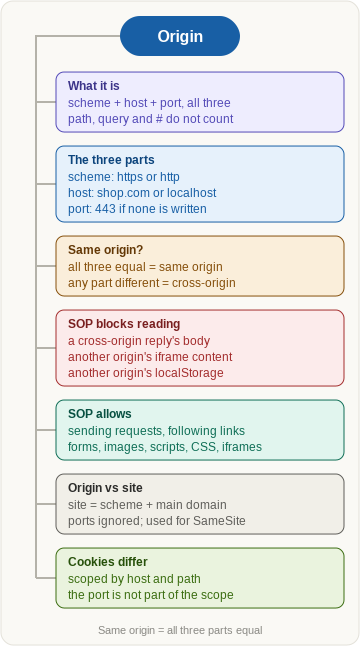
Mental map
Watch
Cyber Security Entertainment, about 4 minutes: what the same-origin policy is and which attacks it stops.
Want more? The detailed Origin page has the same sections with the raw Origin header, cookie attributes, Origin: null, and harder interview questions.
← HTTP caching · CORS →